Mastertronic Help.

Dave.patel

Active Member
Supporting
Messages
16
Reaction score
213
Location
Atlanta
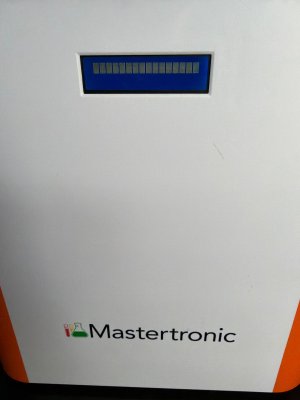
Looking for someone who has experience with the Mastertronics. I recently bought one from a ARC member. I was told to get a new sd card and contact focustronics for the files. I’ve done that and did it correctly but still am getting the bricks on the display. I’m stumped. Obviously, focustronics support is terrible. Help would be greatly appreciated, I’m open to trading some coral for help! I’ve added a picture of the front screen as a reference.
 

Attachments

  • image.jpg
    image.jpg
    298.1 KB · Views: 15
I don’t have any experience with mastertronic but I would see about getting new sd card to rule out the possibility of sd card being the problem. Maybe search the forum of mastertronic to see if others have the same issues? And of course, make sure to “format” the sd card before loading the file may help.

I have both Alkatronic and dosetronic. Older models which seems to be better than newer version. But the new mastertronic looks so different from older version and seems to have fixed alots of issues you will likely run into. Good luck~~
 
Focustronic technical is one guy working 12:00-12:30 while on his lunch break from another job. He has no idea what a Mastertronic is or how it works. Plus English is his third language. Mastertronic owners do have a Facebook page. Might get help there. Or on Reef2Reef.
 
The 2 facebook pages are the official Focustronic users group page. And the unofficial Focustronic support group page.
 
- SD card isn’t being read / isn’t booting properly
- wrong files / wrong folder structure on the SD
- SD card formatted wrong
power supply is weak/bad
- display ribbon/connector isn’t seated right (less common, but possible)

Just a guess. Also, if there a status light on PCB could check to see if pattern gives any error code. No sure how easily accessible the control board is, but in my experience most electronic assy will have something for diagnostics.
 
I’ve tried all of the above. Even got a hold of a well known person from the focustronic support group and video called with him, his in Australia. No resolution. Thanks though.
 
Also one thing to keep in mind. Not sure if you are using a mac to do this, but when it comes to using Balena.Etcher I had issues formatting using a MacBook with the M2 chip.
 
Yeah, but its the way the MacBook writes image files if I understand correctly. I may have terminology switched up or incorrect, so dont take it word for word, but basically when you download that file, or if you unzip the file, apple basically stores it in a format that not compatable with OS, so when you go to create boot media, its flashing the SD card you are loading with that downloaded version, instead of the original format. The image file cant be read anymore at that point, even though everything still looks the same from your end.

Like I said though, this is just my understanding of this so in no way is it technically correct, I just know I had the same issue whem trying to create boot media using a m2 chip Mac. You used to be able to do it before the M2 i belive, so most likely their instruction for the device is just outdated. I would bet if you tried doing the same exact thing but using a old MacBook, or Windows PC, it will work without issues. But make sure if you do it, to re-download the file again from the new PC, instead of sending the translated file from your Mac. There used to be ways to launch windows temporarily on Mac and you could bypass this issue. But from my understanding there is no way to do that on m2 chip or newer.

 
Also another thing to keep in mind, not sure if you mac is anything like mine, but i was also having issues with transferring files because of my MacBook AIR. I do not have a SD card slot, and apparently using offbrand USBC hubs will give you file transfer issues. I heard you dont have those issies if you use a apple USB hub, but I figured it was expensive so I never tried it.
 
Back
Top